- && - AND
- || - OR
- ! - NOT
Logical Operator AND: &&
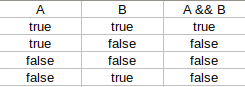
The && operator serves to merge two logical expressions into one, like this:- expression1 && expression2
The result of this expression is true only if expression1 and expression2 are true.
If either one of them is false, the general expression becomes false as well.
The truth table of the && operator is:
For example, for you to donate blood, there must be two conditions:
- Be in legal age
- Not have diseases
That is, for pain you need to be adult AND ALSO not have diseases:
- adulthood && have no diseases
If any of these conditions are not true, you cannot donate blood.
Let's redo the program that says whether you must vote or not.
To be mandatory, it must satisfy two conditions:
- 21 years or older
- Under 65
That is, you must be 21 years old AND (AND) must be under 65 years old.
Our C++ code looks like this:
#include <iostream>
using namespace std;

int main()
{
    int age;

    cout <<"Your age: ";
    cin >> age;


    if( age>=21 && age<65 )
        cout << "Required to vote.";
    else
        cout << "Optional vote";


    return 0;
}
See that it was much more cleaner code, because we made two conditional tests at once within the IF.
If the person is under 21, the first expression will be false and the entire test will be false, going to ELSE.
If it is 65 or older, the second expression is already false, leaving the IF result false as well, going to ELSE.
In both cases, voting is optional.
Logical Operator OR: ||
The logical operator || (OR) joins two expressions like this:
It returns true if any of the expressions are true.
That is, it only returns false if both are false. Check out this operator's truth table:

For example, if on a highway the maximum speed is 80 km/h, walking above and below half (40 km/h ) will give you a traffic ticket. Lets test:
That is: if the speed is greater than 80 km/h OR is below 40 km/h, the driver will be fined. If any of the expressions are true, the entire test is true.
Here's a program that takes the speed of a car and tells you whether it will generate a ticket or not:
- expression1 || expression2
It returns true if any of the expressions are true.
That is, it only returns false if both are false. Check out this operator's truth table:
For example, if on a highway the maximum speed is 80 km/h, walking above and below half (40 km/h ) will give you a traffic ticket. Lets test:
- speed> 80 || speed <40
That is: if the speed is greater than 80 km/h OR is below 40 km/h, the driver will be fined. If any of the expressions are true, the entire test is true.
Here's a program that takes the speed of a car and tells you whether it will generate a ticket or not:
#include <iostream>
using namespace std;

int main()
{
    int speed;

    cout <<"Speed: ";
    cin >> speed;


    if( speed>80 || speed<40 )
        cout << "You'll be fined.";
    else
        cout << "That's ok.";


    return 0;
}
The IF detects if you are going to get a fine, that is, not to get it needs to fall into ELSE, and only falls into ELSE if both expressions are false, so you are neither above 80 nor below 40, so you are between 40 and 80, which is the correct one. Did you get it? OR one thing OR another.
Logical Operator NOT: !
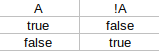
Finally, we have the negation operator.
It turns what is false into true, and what is true into false.
See his truth table:
 That is:
Redoing the first code:
The precedence of operators between them is from top to bottom:
!
&&
||
What if the user types less than 0 or more than 10?
It is a mistake. Arrange the program using the logical operator || if you type notes below 0 or above 10.
It turns what is false into true, and what is true into false.
See his truth table:
- !true is the same as false
- !false is the same as true
Redoing the first code:
#include <iostream>
using namespace std;

int main()
{
    int age;

    cout <<"Your age: ";
    cin >> age;


    if( !(age>=21 && age<65) )
        cout << "Optional vote.";
    else
        cout << "Required to vote";


    return 0;
}
Redoing the second code:
#include <iostream>
using namespace std;

int main()
{
    int speed;

    cout <<"Speed: ";
    cin >> speed;


    if( !(speed>80 || speed<40) )
        cout << "Thats ok.";
    else
        cout << "You'll be fined.";


    return 0;
}
It may seem more complicated or the same thing, in fact it is the same thing, but often it will be more logical and it will make more sense to use the NOT operator in some conditional statements in C++. We will see this a few times over the our C ++ course.
The precedence of operators between them is from top to bottom:
!
&&
||
Logical Operators Exercise
In the last tutorial on nested IF and ELSEs, we posed a question about converting a numeric note to A, B, C ... but there is a bug there.What if the user types less than 0 or more than 10?
It is a mistake. Arrange the program using the logical operator || if you type notes below 0 or above 10.