Showing posts with label Object Oriented Programming. Show all posts

Association, Composition and Aggregation in C++

In this tutorial from our C++ course, we will learn how different Classes and Objects relate to each other, and study this relationship further.

Classes and Objects in Real Life

So far, in our course, we have used classes in a very isolated way, creating and using only one class. But in the real world, it rarely happens. We live in a world of objects.

Often, it only makes sense that there is an object, if there are others. For example, we can have the Human class and the Food class. Human-type objects are you, me, our friends, family ... Food-type objects, rice, beans, meat ... does it make sense for Human-class objects to exist without Food-class objects? Of course not.

And even if one object does not depend on another to exist, it can depend on others to 'work'. For example, objects from the Engine, Gear, Brake, etc. classes work together to make a Car type object work.

That is, in the real world, objects are not isolated. In your projects, you will always create several classes, instantiate several objects, make one create another, send information, another receive data from another object, the method of an object using several other objects, and so on.

Association, Composition and Aggregation

When an object uses a method or service from another object, we say that there is an association there. Yes, it is very broad and generic. We will specify more the types of relationship, in composition and aggregation.

In both cases, an object has another object. However, in composition, an object exists only if the other exists.

For example, the object of type Car only exists if it has an object of the Engine class. There is no car without an engine.

A Human type object, only exists if it has objects like Heart, Lung ... there is no person without these organs (at least for now, some program will design and create organs in the future - of course, it would use C++).

In aggregation, an object has another, but it could exist without it. For example, every car has an owner. That is, it has Human-type objects that have Car-type objects. But a human being does not necessarily need a car to exist.

You need a heart, a head ... mandatorily. Not a car. The relationship of a Car-type object and a Human-type object is aggregation.

Association, Composition and Aggregation in C++

In composition, when a parent object is destroyed, the child objects will also be destroyed. One does not exist without the other. In aggregation, no. In other words, association is something very generic, then there is aggregation (one can exist without the other) and finally the composition, the most specific relationship, where an object only exists if another exists.

But let's put these generic conversations aside and see in practice some relationships between objects.

Composition in C++

Let's start with the most specific. To make it easier, we call the Human and Car classes parent classes. The classes Engine, Heart, Gear, Lung etc., are the child classes, members or components. Or we call it All and Parts, or Object and Member.

To be characterized as a composition, a member is part of the whole. Each part belongs to only one object (that is, the heart belongs only to a human, and the car's engine belongs to only one car).

The class that represents the Whole, will manage the parts, the components. These members are unaware of the existence of the 'Whole'.

Let's create the Engine class, in the constructor we warn that we are starting the engine and in the destructor function we warn that we are turning the engine off. Engine.h:

#ifndef ENGINE_H
#define ENGINE_H

class Engine
{
    public:
        Engine();
        ~Engine();
};

#endif // ENGINE_H

Engine.cpp

#include "Engine.h"
#include <iostream>
using namespace std;

Engine::Engine()
{
    cout << "Starting the engine..."<<endl;
}

Engine::~Engine()
{
    cout << "Turning off the engine..."<<endl;
}

Now we are going to create the Car class, which will do almost the same as the Engine, it will say 'starting the car' in the constructor and 'turning the car off' in the destructor. However, it will have a member, a pointer for the Engine type, the variable 'myEng'.

In the class, we just declare this pointer, Engine.h:

#ifndef CAR_H
#define CAR_H
#include "Engine.h"

class Car
{
    public:
        Car();
        ~Car();
        Engine *myEng;
};

#endif // CAR_H

But in the implementation, we instantiate this pointer, causing the constructor method of the 'myEng' object to be invoked. In Car's destructor function, we delete the Engine pointer, automatically invoking the destructor function, Car.pp:

#include "Car.h"
#include <iostream>
using namespace std;

Car::Car()
{
    cout << "Let's start the car."<<endl;
    myEng = new Engine();
}

Car::~Car()
{
    delete myEng;
    cout << "Car off."<<endl;
}

Our main.cpp:

#include <iostream>
#include "Car.h"
using namespace std;

int main()
{
    Car myCar;

    return 0;
}

The result is as follows:

Let's start the car.
Starting the engine...
Turning off the engine...
Car off.

The 'myEng' object EXISTS ONLY because of the 'myCar' object. Without 'myCar', there is not 'myEng'. 'myEng' belongs to 'myCar'. One object belongs to another.

Whoever 'controls' myEng is also myCar. He who creates the object, instantiates ... and the Car class object dies, the Engine class object also dies. The 'myEng' object belongs only to the 'myCar' object, to none other. And he doesn't know about any other object either, and he doesn't know anything about the Car class.

Those things that characterize the composition well.

Aggregation in C++

We are now going to create the Human class, to create people. They will drive the car. To create an object of this class, we need to pass a string with the person's name and an object of type Car, see how Human.h looks:

#ifndef HUMAN_H
#define HUMAN_H
#include <string>
#include "Car.h"

class Human
{
    public:
        std::string name{};
        Car myCar;
        Human(const std::string& str, Car car);
        ~Human();

};

#endif // HUMAN_H

Now the Human.cpp implementation:

#include "Human.h"
#include <iostream>
#include <string>
using namespace std;

Human::Human(const std::string& str, Car car)
{
    name = str;
    myCar = car;
    cout<<name;
    myCar.turnOn();
}

Human::~Human()
{
    cout<<name;
    myCar.turnOff();
}

We made some changes to Car.h:

#ifndef CAR_H
#define CAR_H
#include "Engine.h"

class Car
{
    public:
        void turnOn();
        void turnOff();
        Engine *myEng;
};

#endif // CAR_H

And in the Car.cpp implementation:

#include "Car.h"
#include <iostream>
using namespace std;

void Car::liga()
{
    cout << " will turn on the car."<<endl;
    myEng = new Engine();
}

void Car::desliga()
{
    cout <<" turned off the car."<<endl;
    delete myEng;
}
 

That is, now we have the functions turnOn() and turnOff(), on objects of the Car type (before we used to turn on and off the constructor and destructor).

See how our main.cpp looks like:

#include <iostream>
#include "Car.h"
#include "Human.h"

using namespace std;

int main()
{
    Car car;
    Human *h1 = new Human("Neil Peart", car);
    delete h1;

    cout << endl;

    Human *h2 = new Human("Bruce Dickinson", car);
    delete h2;

    return 0;
}

That is, we created an object of the Car class and two of the Human class.
Let's see some interesting things. The result if we run the code above is:

Neil Peart will start the car.
Engine running.
Neil Peart turned off the car.
Engine off.

Bruce Dickinson will start the car.
Engine running.
Bruce Dickinson turned off the car.
Engine off.

First, the same 'car' object is used for both 'h1' and 'h2' objects.

Second, it is the h1 and h2 objects that trigger the car's turnOn() and turnOff() functions, that is, they handle the 'car' object.

Finally, the 'car' object does not cease to exist when the 'h1' object ceases to exist. It remained there alive, so much so that it was used by the object 'h2' shortly thereafter. That is, although there is a relationship between them (some objects use others), they are somewhat independent, unlike the relationship between Car and Engine, where engines ONLY EXIST as long as there are cars, and only one engine is used for each car .

These are the characteristics of aggregation.
Between Car and Engine, it's composition.
Between Human and Car, it's aggregation.

Association in C++

Let me tell you the biggest secret of the C++ language: a large, complex system, like a space station or Microsoft Excel, is nothing less than several small objects, playing specific roles.

In other words, a complex system is nothing more than several small objects, working together, as an association.

Thus, during your career as a C++ programmer, always try to create specific, well-defined Classes and Objects, with the right functions and as simple and direct as possible.

To repeat: a large project or system is nothing more than a looot of objects working together, in association, whether by composition or aggregation.

Organization is the key to success in working with object-oriented programming!

Bank Account System with Object-Oriented Programming in C++

In this tutorial, we will use all our knowledge of Object-Oriented Programming in C++, and create a real example of application, a bank account.

How to make a Bank Account System
Exercise: Bank Account

Create a system in which a user bank account is created, where he can check his balance, deposit and withdraw money, use object-oriented knowledge.

Your system should start by displaying a menu with these options, and allow the user to perform these operations as many times as he wants, and decide when to close the system.


The class: Client.h

The customer's balance will be stored in the cash variable. It is initialized with a value of 0, in the constructor function, that is, the customer obviously starts with 0 of money.

We have the menu() function, which will display the options menu, that is, the screen of the ATM of the banking system. It invokes the action() function, which will call each specific operation.

The first operation is checkBalance(), which will check the balance, the account balance.

Then there is the depositCash() function, which is used to add money to your account.

Finally, the withdraw() function, to withdraw money.

Our class looks like this:

#ifndef CLIENT_H
#define CLIENT_H


class Client
{
    public:
        Client();
        void menu();
        void action(int);
        void checkBalance();
        void depositCash();
        void withdraw();

    private:
        double cash;
};

#endif // CLIENT_H

Source: Client.cpp

Everything will start where you should start, with the Client() constructor function.

It simply clears your money, as it is as if your account was created the moment you instantiated the object.

The menu() function will be displaying a menu of options for the user, and asking him to enter a value. This value is stored in the op variable and sent to the action() function, this is done within a do while loop, which will only end if you type 0. In other words, you only exit the menu, if you type 0 to exit.

The action() will take an action, evaluating the op value received from the menu(). This is done in a switch conditional test.

If it is 0, it says that the system is shutting down.

If it is 1, invoke the checkBalance() function, which will simply display the cash variable. Nothing more.

At depositCash (), we ask the user for a value. But we have to test whether this value is positive, because obviously there is no way to deposit a negative value. This test is done on an IF ELSE. If the value is positive, we simply add it to the cash and display the user's balance.

In the withdraw() function, we ask for the amount the user wants to withdraw. Before removing this value from the cash variable, we need to assess whether it is less than cash. After all, you can only withdraw something below, or at most equal to your balance. This test is done with an IF ELSE as well.

Here's how the code looks:

#include "Client.h"
#include <iostream>
using namespace std;

Client::Client()
{
    cash = 0;
    menu();
}

void Client::menu()
{
    int op=0;

    do{
        cout<<"0. Exit"<<endl;
        cout<<"1. Check balance"<<endl;
        cout<<"2. Deposit money"<<endl;
        cout<<"3. Withdraw money"<<endl;
        cin >> op;

        action(op);

    }while(op);
}

void Client::action(int op)
{
    switch(op)
    {
        case 0:
                cout << "Shutting down system."<<endl;
                break;
        case 1:
                checkBalance();
                break;

        case 2:
                depositCash();
                break;

        case 3:
                withdraw();
                break;

        default:
                cout << "Invalid option"<<endl;
    }

}

void Client::checkBalance()
{
    cout<<"\nYour balance is: $" << cash <<endl;
}

void Client::depositCash()
{
    double val;

    cout<< "Value to deposit: ";
    cin >> val;

    if(val>0){
        cash += val;
        checkBalance();
    }
    else
        cout<<"Invalid value, try again"<<endl;

}

void Client::withdraw()
{
    double val;

    cout<< "Value to withdraw: ";
    cin >> val;

    if(val<=cash){
        cash -= val;
        checkBalance();
    }
    else
        cout<<"Insufficient funds"<<endl;
}

main.cpp

Our main will simply instantiate an object. Automatically it activates the constructor function, and everything starts to happen:

#include "Client.h"

int main()
{
    Client c;
    return 0;
}

See how our main() is simple, clean and to the point.


Hacker challenge

There is a way to hack this system. To add money to your account in a 'hacker' way. Can you find out how it is? Type in the comments.

Array of objects in C++

In this tutorial from our C++ e-book, we will learn how to create an array of objects, as well as how to manipulate them.

Creating an array with Objects in C++

In the past tutorial, we created a class that averaged two or three grades for students. We will do something similar in this tutorial.

Let's create the Student class, and initially it gets two grades. The constructor function correctly sets variables, and has a function called getAverage() that returns the average of the two grades:

#include <iostream>
using namespace std;
class Student
{
    private:
        double grade1, grade2;

    public:
        Student();
        Student(double, double);
        double getAverage();
};

Student::Student()
{
    grade1 = 0;
    grade2 = 0;
}
double Student::getAverage() { return (grade1+grade2)/2; } int main() { Student NeilPeart(10, 8); cout<<NeilPeart.getAverage()<<endl; return 0; }

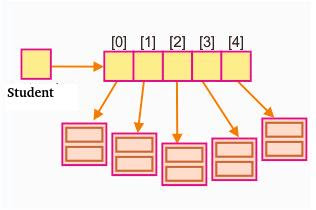
Note that we created only one object, the student Neil Peart. But which school has only one student? There are thousands, but let's take it easy. We will now work with 5 students. We could do:

  • Student alu1, alu2, alu3, alu4, alu5;

But, what if it was a real project, with a thousand students? Would you do it up to the alu1000?
Of course not, right, buddy!

You studied by Progressive C++, you are a smart person and you will soon remember our beloved and beautiful arrays, to work with many variables at the same time.

To declare 5 integers, we do:

  • int num[5];

To declare 5 chars, we do:

  • char letter[5];

So guess what we do to create 5 objects of the Student class? That's right:

  • Student alu[5];

Array of Objects

Run the code to the code below:

#include <iostream>
using namespace std;

class Student
{
    private:
        double grade1, grade2;

    public:
        Student();
        Student(double, double);
        double getAverage();
};

Student::Student()
{
    grade1 = 0;
    grade2 = 0;
}

Student::Student(double g1, double g2)
{
    grade1 = g1;
    grade2 = g2;
}

double Student::getAverage()
{
    return (grade1+grade2)/2;
}


int main()
{
    Student alu[5];
    cout<<alu[0].getAverage()<<endl;

    return 0;
}

The result will be 0, as we don't initialize the array objects.

How to Initialize Objects from an Array

We could initialize the objects one by one, after declaring:

    Student alu[5];
    alu[0] = Student(10,9);
    alu[1] = Student(10,8);
    alu[2] = Student(10,7);
    alu[3] = Student(10,6);
    alu[4] = Student(10,5);

Or we could just initialize everything when instantiating objects:
    Student alu[5] = { Student(10,9),
                       Student(10,8),
                       Student(10,7),
                       Student(10,6),
                       Student(10,5) };
Or even directly:
    Student alu[5] = { {10,9},
                       {10,8},
                       {10,7},
                       {10,6},
                       {10,5} };
If you have other constructor functions (that receive one grade or 3, for example), you can also place them directly in the code, C++ will know how to call the correct constructor. And if you don't provide any information about any element of the array, C++ will invoke the default constructor (it's always good to have one in the class).

Accessing members of the Object Array

Ok, we have already declared and initialized several objects at once, now you need to learn how to access their members.

When we had an object named 'name', we accessed its members using a dot:
  • name.var
  • name.func()

Here's the same thing, but the variable is an array element:
  • arr[0].grade
  • arr[1].getAverage();
That is, the same thing, just use the cute array and the dot, followed by the member of the class / object.
The following program creates 5 objects, initializes with the students' grade and displays their averages with the getAverage() function:
#include <iostream>
using namespace std;

class Student
{
    private:
        double grade1, grade2;

    public:
        Student();
        Student(double, double);
        double getAverage();
};

Student::Student()
{
    grade1 = 0;
    grade2 = 0;
}

Student::Student(double g1, double g2)
{
    grade1 = g1;
    grade2 = g2;
}

double Student::getAverage()
{
    return (grade1+grade2)/2;
}


int main()
{
    Student alu[5] = { {10,9},
                       {10,8},
                       {10,6},
                       {10,5} };


    cout<<alu[0].getAverage()<<endl;
    cout<<alu[1].getAverage()<<endl;
    cout<<alu[2].getAverage()<<endl;
    cout<<alu[3].getAverage()<<endl;
    cout<<alu[4].getAverage()<<endl;

    return 0;
}
Note that we only initialized the first four students, so the fifth one was initialized by the default constructor. What was the average of the fifth student (alu[4])?

Now do another test: create a class, which only has the default constructor, displaying a message on the screen. Create an array of size 10, of these objects. What happens?

Constructor function overloading in C++

In this tutorial from our Progressive C++ course, we will learn about overloading the constructor functions.

Overload constructors in C++


Many constructors functions

You were hired by a university to create a system to help teachers, especially to work with students' grades.

As you took the Progressive C++ course, you will create a fantastic system, with several classes and objects, hardcore.
But let's take it easy.

Let's create a math class, called Math. For simplicity, she'll do just one operation: average two grades, one student, that's all.

The constructor function will tell the student's average right away.

See how our code looks:

#include <iostream>
using namespace std;

class Math
{
    public:
        Math(double, double);
};


Math::Math(double g1, double g2)
{
    cout<<"Average: "<<(g1+g2)/2<<endl;
}


int main()
{
    Math BruceDickinson(10, 8);

    return 0;
}

The result was 9 right, all nice and cool, and student Bruce Dickinson got a great average.

And speaking of market experience, it is SOOOO common for customers to be asking for changes, new features, etc. Get used to it, it is always requests and complaints.

In that case, the university now wants you to average 3 grades.

Time, it's very simple, just add one more parameter to the list of the constructor function, create the object with the 3 notes and send a bullet, that's it, our code looks like this:

#include <iostream>
using namespace std;

class Math
{
    public:
        Math(double, double, double);
};


Math::Math(double g1, double g2, double g3)
{
    cout<<"Average: "<<(g1+g2+g3)/3<<endl;
}


int main()
{
    Math NeilPeart(10, 9, 10);

    return 0;
}

Everything was fine and Neil Peart had an almost perfect average.

But then your university get in contact and says: look, there are students who will make two disciplines and students who will make three, that is, their system has to calculate the average in both cases.

And now? How will the constructor guess? One hour calculates the average by dividing by 2 and in the other example he divided by 3 because he had one more variable.

Create a class for each case? Of course not, as this is a complication.

Programming was made to make the world easier! This is where builder overloading comes in.


Constructors overloading in C++

C++ has a card up its sleeve: it allows you to create as many constructors as you want. That's right, functions with the same name.
But one thing has to be different: the list of parameters.

Example of a list of different parameters:

  • Math (double, double)
  • Math (double, int)
  • Math (int, double)
  • Math (double, double, double, float, char, int)
  • ...

So, in our example of averages, just create two constructor functions, one that receives two grades and the other that receives three grades:

#include <iostream>
using namespace std;

class Math
{
    public:
        Math(double, double);
        Math(double, double, double);
};

Math::Math(double g1, double g2)
{
    cout<<"Average: "<<(g1+g2)/2<<endl;
}

Math::Math(double g1, double g2, double g3)
{
    cout<<"Average: "<<(g1+g2+g3)/3<<endl;
}


int main()
{
    Math BruceDickinson(10, 8);
    Math NeilPeart(10, 9, 10);

    return 0;
}

See how smart C++ is. When you created the BruceDickinson object, you only passed two arguments, and the object invoked the constructor function that only works with two numbers.

When he created the ana object, he called the other constructor function, the one that works with three values.

That is, C++ calls the correct constructor!
This is the constructor overloading.

Now if you have two constructors with the same parameter list, then there is no way for C++ to guess what function you are trying to invoke, okay?

We will learn a little more about overload when we study a super special class, the string, which does crazy things and wonders with overloading.

Desctructor Function in C++

In this tutorial for our C++ course, we will learn about and use destructors functions.

The Destructor function

In the last tutorial, we talked about the Constructor Function, which exists in every class and is executed whenever an object is instantiated.

Similarly, there is the destructor function, which is performed only when the object is destroyed.

To create a destructor function, just define a function with the same name as the class, with the tilde symbol (~) before it. Let's look at an example, creating a class with constructor and destructor:

#include <iostream>
using namespace std;

class Test
{
    public:
        Test();
        ~Test();
};

Test::Test()
{
    cout << "Constructor" << endl;
}

Test::~Test()
{
    cout << "Destructor" << endl;
}

int main()
{
    Test t;

    return 0;
}

The result will be the two words on the screen. One occurs when creating the object and another occurs when the program ends, and in this case the destructor is invoked.

And just like the constructors, every class has a destructor. Even if you don't define one, there will be a blank pattern, but it will always exist.

They also do not accept any arguments or list of parameters and do not return any information.

What is the Destructor Function for?

Basically, to do things that must be done when an object ceases to exist.
A very common example is to free up memory that has been allocated within an object.

At the moment, we are using silly, small objects, but they are usually giant, with classes with hundreds of variables and dozens of functions. And inside, it is common to dynamically allocate memory, and when that object ceases to exist, it is a good practice to free up all that memory (especially in more critical systems with little memory, such as your watch or your refrigerator's digital system).

Let's suppose you created a system for the bank, and you always want to do a test: if someone accessed the Bank class, instantiating an object. To do this, you define a global scope variable called "spy" with an initial value of 0.

To check if any objects were created, make 'spy = 1' in the destructor, see:

#include <iostream>
using namespace std;

int spy=0;

class Bank
{
    public:
        ~Bank();
};


Bank::~Bank()
{
    spy = 1;
}

int main()
{
    Bank *b;
    b = new Bank;

    delete b;

    cout<<"Spy: " << spy << endl;
    return 0;
}

Let's suppose it is a giant class, with several members, several things happening ... you created an object, used it, did everything correctly and such. Then it is time to delete it, and at that time the destructor function will be executed.

The result will be 'Spy: 1' there in the main(), indicating that someone messed with that Bank class. That is, the destructor, since it is always executed, will execute the operation 'spy = 1'.

Another example of a destructor function is if you create a game and have a character (which is an object) and he simply dies or leaves the game. In your destructor function, you delete the name, take your points, take it out of the teams, take it out of the ranking.

And etc etc, around there people, almost always have things to do when an object ceases to exist, ok?

Constructors Functions in C++ - Object Oriented

In this tutorial, we will learn about a special type of function, the Constructor function, which plays a very important role in object orientation.

The C++ Constructor function

There is a very important function and used in object oriented, it is the construction function.
And it has some unique and special features.

The first is that the name is the same as the class name. That is, if your class is called "MyClass", the constructor function must be called "MyClass()", mandatorily, ok?

Another characteristic of it is that, as soon as we instantiate an object, the constructor function is always automatically invoked!

Finally, one last characteristic, it does not return any value! Do not write void, int, doublet etc., anything in your header and implementation.

Let's see a test of a working construction function? Let's create the "MyClass" class that has only one member, the "MyClass()" function, which will simply display a message, it looks like this:

#include <iostream>
using namespace std;

class MyClass
{
    public:
        MyClass();
};

MyClass::MyClass()
{
    cout << "Progressive C++ Course"<<endl;
}

int main()
{
    MyClass c;

    return 0;
}

Prontinho! Apenas criamos o objeto 'c' e veja o que apareceu na tela:

Constructor functions


Construction function: What is it for?

Ok, we've already seen how to do it, how it works and the result ... but what is it for? Just to show some silly messages on the screen?
Of course not, young man!

As the name says, it serves to 'construct' things, in this case, it builds things automatically. When we create an object, it is interesting that it already does some internal operations immediately, without having to always do everything manually.

This type of constructor, we call it default, because it doesn't take any arguments. However, the most common and useful way to use a constructor function is with a list of parameters, which are information that comes from the outside into the object, and will play an important role inside.


Constructor function: How to use?

For example, let's look at our Rect class, which created rectangles. Remember that we always had to use the setter functions to define the length and width values. How about if the builder did this automatically?

See how it looks:

#include <iostream>
using namespace std;

class Rect
{
    private:
        double length, width;

    public:
        Rect(double, double);
        double getArea();
        double getPerimeter();
};

Rect::Rect(double l, double w)
{
    length = l;
    width = w;
}
double Rect::getArea()
{
    return length * width;
}
double Rect::getPerimeter()
{
    return 2*(length+width);
}

int main()
{
    double len, wid;

    cout<<"Length: ";
    cin >> len;

    cout<<"Width: ";
    cin >> wid;

    Rect r(len, wid);

    cout<<"Area: " << r.getArea() << endl;
    cout<<"Perimeter: " << r.getPerimeter() << endl;

    return 0;
}

Note that in the header of the constructor, we have already specified that it will receive two variables of type double.

In the implementation, we call these variables 'l' and 'w', which will be provided later by the user. And what does our constructor function do? It will set the correct values for 'length' and 'width'.

In main, we ask for the length and width values, and then simply instantiate an object of type Rect, named 'r'. Notice now that in it we send two arguments, which are the two arguments that the constructor function will use!

Ready, internally, inside the object, the constructor has already done everything and the functions getArea() and getPerimeter() can now be used.

A little more about the Constructor Function

Another curiosity about constructors is that they ALWAYS exist! Even if you don't define any, C++ goes there and creates one, empty, that does nothing.

When you do:

  • MyClass c;

It will automatically invoke the constructor, but you don't see anything happening, as you haven't defined any constructors.

Another trick you may need and use, is through pointers, declaring a pointer to an object:

  • MyClass * ptrClass;

When doing this, the constructor method will not be executed, since an object was not created, only a pointer to an object.

Now if you do this next:

  • ptrClass = new MyClass;

Then, the object was instantiated and allocated in memory, and the constructor will be summarily executed.