Showing posts with label Function. Show all posts

Constructor function overloading in C++

In this tutorial from our Progressive C++ course, we will learn about overloading the constructor functions.

Overload constructors in C++


Many constructors functions

You were hired by a university to create a system to help teachers, especially to work with students' grades.

As you took the Progressive C++ course, you will create a fantastic system, with several classes and objects, hardcore.
But let's take it easy.

Let's create a math class, called Math. For simplicity, she'll do just one operation: average two grades, one student, that's all.

The constructor function will tell the student's average right away.

See how our code looks:

#include <iostream>
using namespace std;

class Math
{
    public:
        Math(double, double);
};


Math::Math(double g1, double g2)
{
    cout<<"Average: "<<(g1+g2)/2<<endl;
}


int main()
{
    Math BruceDickinson(10, 8);

    return 0;
}

The result was 9 right, all nice and cool, and student Bruce Dickinson got a great average.

And speaking of market experience, it is SOOOO common for customers to be asking for changes, new features, etc. Get used to it, it is always requests and complaints.

In that case, the university now wants you to average 3 grades.

Time, it's very simple, just add one more parameter to the list of the constructor function, create the object with the 3 notes and send a bullet, that's it, our code looks like this:

#include <iostream>
using namespace std;

class Math
{
    public:
        Math(double, double, double);
};


Math::Math(double g1, double g2, double g3)
{
    cout<<"Average: "<<(g1+g2+g3)/3<<endl;
}


int main()
{
    Math NeilPeart(10, 9, 10);

    return 0;
}

Everything was fine and Neil Peart had an almost perfect average.

But then your university get in contact and says: look, there are students who will make two disciplines and students who will make three, that is, their system has to calculate the average in both cases.

And now? How will the constructor guess? One hour calculates the average by dividing by 2 and in the other example he divided by 3 because he had one more variable.

Create a class for each case? Of course not, as this is a complication.

Programming was made to make the world easier! This is where builder overloading comes in.


Constructors overloading in C++

C++ has a card up its sleeve: it allows you to create as many constructors as you want. That's right, functions with the same name.
But one thing has to be different: the list of parameters.

Example of a list of different parameters:

  • Math (double, double)
  • Math (double, int)
  • Math (int, double)
  • Math (double, double, double, float, char, int)
  • ...

So, in our example of averages, just create two constructor functions, one that receives two grades and the other that receives three grades:

#include <iostream>
using namespace std;

class Math
{
    public:
        Math(double, double);
        Math(double, double, double);
};

Math::Math(double g1, double g2)
{
    cout<<"Average: "<<(g1+g2)/2<<endl;
}

Math::Math(double g1, double g2, double g3)
{
    cout<<"Average: "<<(g1+g2+g3)/3<<endl;
}


int main()
{
    Math BruceDickinson(10, 8);
    Math NeilPeart(10, 9, 10);

    return 0;
}

See how smart C++ is. When you created the BruceDickinson object, you only passed two arguments, and the object invoked the constructor function that only works with two numbers.

When he created the ana object, he called the other constructor function, the one that works with three values.

That is, C++ calls the correct constructor!
This is the constructor overloading.

Now if you have two constructors with the same parameter list, then there is no way for C++ to guess what function you are trying to invoke, okay?

We will learn a little more about overload when we study a super special class, the string, which does crazy things and wonders with overloading.

Desctructor Function in C++

In this tutorial for our C++ course, we will learn about and use destructors functions.

The Destructor function

In the last tutorial, we talked about the Constructor Function, which exists in every class and is executed whenever an object is instantiated.

Similarly, there is the destructor function, which is performed only when the object is destroyed.

To create a destructor function, just define a function with the same name as the class, with the tilde symbol (~) before it. Let's look at an example, creating a class with constructor and destructor:

#include <iostream>
using namespace std;

class Test
{
    public:
        Test();
        ~Test();
};

Test::Test()
{
    cout << "Constructor" << endl;
}

Test::~Test()
{
    cout << "Destructor" << endl;
}

int main()
{
    Test t;

    return 0;
}

The result will be the two words on the screen. One occurs when creating the object and another occurs when the program ends, and in this case the destructor is invoked.

And just like the constructors, every class has a destructor. Even if you don't define one, there will be a blank pattern, but it will always exist.

They also do not accept any arguments or list of parameters and do not return any information.

What is the Destructor Function for?

Basically, to do things that must be done when an object ceases to exist.
A very common example is to free up memory that has been allocated within an object.

At the moment, we are using silly, small objects, but they are usually giant, with classes with hundreds of variables and dozens of functions. And inside, it is common to dynamically allocate memory, and when that object ceases to exist, it is a good practice to free up all that memory (especially in more critical systems with little memory, such as your watch or your refrigerator's digital system).

Let's suppose you created a system for the bank, and you always want to do a test: if someone accessed the Bank class, instantiating an object. To do this, you define a global scope variable called "spy" with an initial value of 0.

To check if any objects were created, make 'spy = 1' in the destructor, see:

#include <iostream>
using namespace std;

int spy=0;

class Bank
{
    public:
        ~Bank();
};


Bank::~Bank()
{
    spy = 1;
}

int main()
{
    Bank *b;
    b = new Bank;

    delete b;

    cout<<"Spy: " << spy << endl;
    return 0;
}

Let's suppose it is a giant class, with several members, several things happening ... you created an object, used it, did everything correctly and such. Then it is time to delete it, and at that time the destructor function will be executed.

The result will be 'Spy: 1' there in the main(), indicating that someone messed with that Bank class. That is, the destructor, since it is always executed, will execute the operation 'spy = 1'.

Another example of a destructor function is if you create a game and have a character (which is an object) and he simply dies or leaves the game. In your destructor function, you delete the name, take your points, take it out of the teams, take it out of the ranking.

And etc etc, around there people, almost always have things to do when an object ceases to exist, ok?

Matrix in Functions

In this tutorial from our C++ ebook, we will learn how to work with matrix and functions, learning to declare, invoke and use these two important topics together.

How to Pass a Matrix to a Function

In the study of arrays, we saw that there are some ways to declare the header of functions with arrays as parameters, as follows:
  • type func(tipo *array);
  • type func(tipo array[tamanho]);
  • type func(tipo array[]);

In other words, just pass the pointer (*array - we will study more ahead) or just with the pair of open brackets (array[]).

In the case of two-dimensional arrays, we need to specify the number of columns in the array we are sending:
  • void func(int arr[][COLUMN]);

You see, the number of rows is not mandatory (we can even pass), but the number of columns is.
Let's declare and initialize a 2x2 matrix and then send it to the show() function, which will simply display it as a table, see how our code looks:
#include <iostream>
using namespace std;

void show(int arr[][2], int row)
{
    for (int i=0 ; i<row ; i++){
        for(int j=0 ; j<2 ; j++)
            cout<<arr[i][j]<<"  ";
        cout<<endl;
    }
}

int main()
{
    int arr[][2]={ {1,2}, {3,4} };
    show(arr, 2);
    return 0;
}
Look some important things in the code above.

First, we pass the array arr[][2] to the function, with the number of columns.
But what about the number of lines? How will the function know how many lines to print the table?
It doesn't know, so we pass another parameter in the function, the integer 'row'.

C++ Matrix: Passing by Reference

All data passing to functions that involve arrays and matrix is by reference. Ever.
That is, passed an array to a function? It will directly access the array and its data, directly into memory. It is not a copy that goes to function, it is not a pass for value, ok?

That means one thing: watch out! Functions can modify the arrays, always remember that.
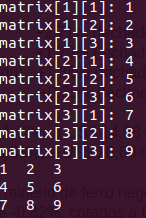
The code below introduces the 'init' function, which will receive an array and initialize each element of it, asking the user:
#include <iostream>
using namespace std;
const int COLS = 3;
const int ROWS = 3;

void init(int arr[][COLS], int ROWS)
{
    for(int i=0 ; i<ROWS ; i++)
        for(int j=0 ; j<COLS ; j++){
            cout << "matrix["<<i+1<<"]["<<j+1<<"]: ";
            cin  >> arr[i][j];
        }
}

void show(int arr[][COLS], int ROWS)
{
    for (int i=0 ; i<ROWS ; i++){
        for(int j=0 ; j<COLS ; j++)
            cout<<arr[i][j]<<"  ";
        cout<<endl;
    }
}

int main()
{
    int arr[ROWS][COLS];
    init(arr, ROWS);
    show(arr, ROWS);
    return 0;
}
To improve the organization, we have already defined the rows (ROWS) and columns (ROLS) as global variables of the constant type, so that there is no danger of anyone, anywhere in the code, changing their values. This makes the code clearer and safer for maintenance.

Array of arrays in C++

Matrix Exercise in C ++

Create a 4x4 matrix, where each row represents a student's grades, and each column is a different subject. You must create a function that will fill in the students' grades, one by one, indicating which is the subject and which is the student.

Then, your program should display, in an organized manner, the grades of each student, as well as the average of each, the class average for each subject, and the general average, of all students of all grades.

Post your solution in the comments.

Arrays in Functions

In this tutorial from our C++ Arrays section, we will learn how to work with arrays and functions, learning how to pass an array as an argument, how to return and receive an array, how to copy, compare and change arrays using functions.

Arrays as arguments to Functions

What basically differentiates an integer variable from an array of integers? Let's see the statements:
  • int num;
  • int num[2112];

Well, it's the pair of square brackets, with a number inside. Do you agree?
When we pass an integer to a function, its prototype is:
  • show(int num); or show(int);

So, as you might suspect, to pass an array as an argument, you can do, in the prototype:
  • show(int num[]); or show(int []);

You see, you only pass with the pair of brackets, okay? No number inside.
In the function code, the header is with: show (int num[]);

Let's give a code example of an array that we declared in main(), of integers, we pass to the show() function and it displays these elements.
Look at how we invoke the function: show (num);

The name of the array is 'num', okay? Do not: show(num[]) to invoke the function.
#include <iostream>
using namespace std;

void show(int []);

int main()
{
    int num[]={10, 20, 30};

    show(num);

    return 0;
}

void show(int num[])
{
    int count;

    for(count=0 ; count<3 ; count++)
        cout<<"Elements "<<count+1<<": "<<num[count]<<endl;
}
Got it? However, there is a problem ... the function 'already knew' beforehand that the array had 3 elements. But, well, the functions don't have a crystal ball. Therefore, it is common and usual, to pass along with the array, its size too, for the functions:
#include <iostream>
using namespace std;

void show(int [], int);

int main()
{
    int num[]={10, 20, 30, 40, 50};
    int size=5;
    show(num, size);

    return 0;
}

void show(int num[], int size)
{
    int count;

    for(count=0 ; count<size ; count++)
        cout<<"Elements "<<count+1<<": "<<num[count]<<endl;
}

When we study the vector class, in STL, we will see more dynamic and powerful types of arrays, and we will not have to worry about informing the size of the array, as it will be information specific to the structure we are going to use.

Return Array: Pass by reference

Let's create an array called num[], insert some numbers.
Next, let's move on to the doub() function, which will double each element of the array, and print it doubled.

Then, we print, now in main(), again the array num:
#include <iostream>
using namespace std;

void doub(int [], int);

int main()
{
    int num[]={10, 20, 30, 40, 50};
    int size=5, count;

    doub(num, size);

    for(count=0 ; count<size ; count++)
        cout<<num[count]<<"  ";

    return 0;
}

void doub(int num[], int size)
{
    int count;

    for(count=0 ; count<size ; count++)
        num[count] *= 2;

    for(count=0 ; count<size ; count++)
        cout<<num[count]<<"  ";

    cout<<endl;
}
The result is:
20  40  60  80  100
20  40  60  80  100

Now, look at that! You passed an array to the function. Inside it, it doubled.
When you returned from the function, to main(), and you printed the array again, it was doubled.
In other words: the function changed the array.

Although you only passed the name of the array, it changed the original array. That is: when we pass an array to a function, this pass is by reference. When we pass the array name to the function, C++ passes the actual address of the array. Thus, the function changes that memory position, directly, and not a copy of the value (as it happens when passing by value).

This is for efficiency reasons, since it would take a long time to make a copy of the arrays passed to the functions (on a day-to-day basis, we work with very large arrays).

OK? C++ passes the array by reference, don't forget!

How to copy Arrays

Often, we want to do some things with arrays, but without changing them.
For example, suppose we have 'num' array of integers, and we want another array where each element is triple the value of each element of the 'num' array.

What we can do is first create a copy of 'num', let's call it 'copy', and bang, we send 'copy' to a function that triples the elements. As the passage is by reference, it will change the values of the 'copy' and will not even know about the existence of 'num', which is unchanged.

To make a 'copyArray' function that makes a copy of an array, we need to pass both arrays as an argument to the function, as well as their size, which must be necessarily the same. Then, just copy element by element, with a loop.

See how our code looks:
#include <iostream>
using namespace std;

void copyArray(int [], int [], int);
void triple(int [], int);

int main()
{
    int num[]={10, 20, 30, 40, 50}, copy[5];
    int size=5, count;

    copyArray(num, copy, size);
    triple(copy, size);

    cout<<"Original Array: "<<endl;
    for(count=0 ; count<size ; count++)
        cout<<num[count]<<"  ";

    cout<<"\nTriplicate Array: "<<endl;
    for(count=0 ; count<size ; count++)
        cout<<copy[count]<<"  ";

    return 0;
}

void copyArray(int num[], int copy[], int size)
{
    int count;

    for(count=0 ; count<size ; count++)
        copy[count] = num[count];
}

void triple(int copy[], int size)
{
    int count;

    for(count=0 ; count<size ; count++)
        copy[count] *= 3;

}
Result:
Original Array:
10 20 30 40 50

Tripled Array:
30 60 90 120 150

If you really want to preserve the original 'num' array and really want to make sure it doesn't change, you can declare it and use it as const:

  • In the header: void copyArray(const int [], int [], int);
  • In the function declaration: void copyArray(const int num [], int copy [], int size) {...}
  • In array declaration: const int num [] = {10, 20, 30, 40, 50};

Random numbers in C++: How to generate with rand(), srand() and time() functions

In this tutorial from our Progressive C++ course, we will learn how to generate numbers or any range of random, or random, numbers.

Random numbers with the function rand()

In many programs, it will be necessary to have random numbers.

For example, to draw a song in your player, to choose a random video from Youtube, to make a draw with Instagram followers, to choose a location on the game map that you created in C++, and etc. etc. etc.

The first way we have to do this is by using the rand() function, from the cstdlib library.
It will generate a number between 0 and the constant RAND_MAX.

First, let's look at the value of this RAND_MAX, which can vary from machine to machine:
#include <iostream>
#include <cstdlib>
using namespace std;

int main()
{
    cout<<"Interval: 0 - "<<RAND_MAX<<endl;

    return 0;
}
The result of the previous program on my machine was 2147483647.
And on your PC?

Now let's generate a random number:
#include <iostream>
#include <cstdlib>
using namespace std;

int main()
{
    cout<<rand()<<endl;

    return 0;
}
Now let's generate 6 random numbers:
#include <iostream>
#include <cstdlib>
using namespace std;

int main()
{
    int i;

    for(i=0 ; i<6 ; i++)
        cout<<rand()<<" ";

    return 0;
}
Did you notice anything?
Close your program. Open it again ... did you notice anything?

Yes, the random numbers are repeated! But, calm down, let's see how to solve this.

The function srand() and random seeds

In truth, there is no purely random number. There is a whole science, and studies and more studies and research on top of that.

Basically, some rule will have to be used to generate these numbers, which are actually pseudo-random. However, there is a way around this.

It is by providing numbers, ourselves, for C++ to take these values and generate different numbers from them. For this, we will use the srand() function, which accepts an integer as a parameter (an unsigned int, actually).

For example, do:
#include <iostream>
#include <cstdlib>
using namespace std;

int main()
{
    srand(2112);
    cout<<rand()<<endl;

    return 0;
}
See that now the value of the rand() has changed, it was no longer those numbers repeating.

Now it will generate other 'random' ones, as we supply 2112 as seed. But if you close and open the program, you will notice that the same 'random' values will appear.

Try this now:
#include <iostream>
#include <cstdlib>
using namespace std;

int main()
{
    int i;

    for(i=1 ; i<=10 ; i++){
        srand(i);
        cout<<rand()<<endl;
    }

    return 0;
}
Now everything was different, because at each iteration the seed that fed the srand() was different.
But even so, if you close and open it again, everything will be the same again, damn...

Function time() from library ctime

See how brilliant programmers are.

There is a function, from the ctime library, the time(), which when invoked returns the number of seconds since 00:00 on January 1, 1970. The trick is to use it as a seed generator, for srand().

Look:
#include <iostream>
#include <cstdlib>
#include <ctime>
using namespace std;

int main()
{
    unsigned seed = time(0);

    srand(seed);
    cout<<rand()<<endl;

    return 0;
}
Open and close ... several times ... always different now, the number drawn!
After all, every second the team's return (0) is different, generating different seeds for srand(), which changes the rand (), which gives us different random numbers! PIMBA!

Choosing value ranges
1443561896
1944127442
107792574
1300800110
...
What kind of values are these? Very large ... we will rarely want to generate numbers that big. We want random ones that are 0 or 1 ... from 1 to 6 ... from 1 to 60 ... between 0 and 100 ... something like that, do you agree?

This is easily resolved with the rest of the division operator: %

For example, for:

Generate random ones that are 0 or 1
Just do: rand ()% 2
#include <iostream>
#include <cstdlib>
#include <ctime>
using namespace std;

int main()
{
    unsigned seed = time(0);

    srand(seed);
    cout<<rand()%2<<endl;

    return 0;
} 
  • Generate random from 1 to 10
Using rand ()%10: it will generate the numbers: 0, 1, 2, 3, 4, 5, 6, 7, 8 or 9
So, just add 1, and we have numbers from 1 to 10.

#include <iostream>
#include <cstdlib>
#include <ctime>
using namespace std;

int main()
{
    unsigned seed = time(0);

    srand(seed);
    cout<<1+rand()%10<<endl;

    return 0;
}


Nice, right?

Odds or Even in C++: How to Program

In this tutorial, we will learn how to program the Odds or Even game, in C++, where the user will play against the computer.

Odds or Even in C ++: Commented Game Code

The variables 'player' and 'computer' will store, respectively, the number of wins for you and the machine, respectively. The scoreboard() function is only used to display the scoreboard, using these variables.

The odds_even() function is used to ask the player if he wants to choose even (must enter 0) or odd (enter 1), and returns that value.

In the human_play() function, the user will choose a number to play.
In the computer_play() function, your machine will draw a number from 0 to 10, using random number generation.

Finally, the play() function will take which option the player chose (even or odd), the number the player launched and the number the machine played. It will add these chosen numbers and test if it is even (rest of the sum must be 0) or odd (rest of the sum must be 1).

He notifies the result he gave, who won and increases the variable 'player' or 'computer' correctly, for display on the scoreboard.

In main(), you have the 'cont' variable, to decide whether the game should run again or not.

The 'oddseven' variable receives the user's option, whether he wants EVEN or ODD.

The number that the player chose is in the variable 'num_player' and the machine drawn is in 'num_comp'.

Now just make the move and display the score.
To ask if the player wants to play again and to ensure that at least one move occurs, we use the DO WHILE loop.

Even or Odd game code in C ++


#include <iostream>
#include <cstdlib>
#include <ctime>
using namespace std;

int player=0,
    computer=0;

void scoreboard();
int odds_even();
int human_play();
int computer_play();
void play(int oddseven, int play, int comp);

int main()
{
    int cont=1,
        oddseven,
        num_player,
        num_comp;

    do{
        oddseven = odds_even();
        num_player = human_play();
        num_comp = computer_play();
        play(oddseven, num_player, num_comp);

        scoreboard();
        cout<<"\nPlay again?"<<endl;
        cout<<"0. Exit"<<endl;
        cout<<"1. Again"<<endl;
        cin >> cont;

    }while(cont);
    return 0;
}

int odds_even()
{
    int num;

    cout<<"\nOdds or Even? Type:"<<endl;
    cout<<"0 for even"<<endl;
    cout<<"1 for odds"<<endl;
    cin >> num;

    return num;
}

int human_play()
{
    int num;
    cout<<"\nType a number from 0 to 10:"<<endl;
    cin >> num;
    return num;
}

int computer_play()
{
    unsigned seed = time(0);
    srand(seed);

    return rand()%11;
}

void play(int oddseven, int play, int comp)
{
    cout<<"\nMOVE: "<<endl;
    cout<<"Human    = "<<play<<endl;
    cout<<"Machine  = "<<comp<<endl;
    cout<<"Sum      = "<<(play+comp)<<endl;
    cout<<"Result   = ";

    if( (play+comp)%2 == 0 )
        cout<<"EVEN\n";
    else
        cout<<"ODD\n";

    if( (play+comp)%2 == oddseven){
        cout<<"\Human won!"<<endl;
        player++;
    }
    else{
        cout<<"\nMachine won!"<<endl;
        computer++;
    }

}


void scoreboard()
{
    cout <<"\nSCOREBOARD:"<<endl;
    cout <<">>>>>>>>>>>>>>>>>>>>>>>>>>>>>>"<<endl;
    cout <<"Player: "<<player<<"\t Computer: "<<computer<<endl;
    cout <<"<<<<<<<<<<<<<<<<<<<<<<<<<<<<<<"<<endl;
}

Could you improve and make our game more robust? For example, checking if the user entered a number from 0 to 10? Also checking if he types 0 or 1, to continue playing. Any more flaws or weaknesses, did you notice?