Showing posts with label Array of arrays. Show all posts

Matrix in Functions

In this tutorial from our C++ ebook, we will learn how to work with matrix and functions, learning to declare, invoke and use these two important topics together.

How to Pass a Matrix to a Function

In the study of arrays, we saw that there are some ways to declare the header of functions with arrays as parameters, as follows:
  • type func(tipo *array);
  • type func(tipo array[tamanho]);
  • type func(tipo array[]);

In other words, just pass the pointer (*array - we will study more ahead) or just with the pair of open brackets (array[]).

In the case of two-dimensional arrays, we need to specify the number of columns in the array we are sending:
  • void func(int arr[][COLUMN]);

You see, the number of rows is not mandatory (we can even pass), but the number of columns is.
Let's declare and initialize a 2x2 matrix and then send it to the show() function, which will simply display it as a table, see how our code looks:
#include <iostream>
using namespace std;

void show(int arr[][2], int row)
{
    for (int i=0 ; i<row ; i++){
        for(int j=0 ; j<2 ; j++)
            cout<<arr[i][j]<<"  ";
        cout<<endl;
    }
}

int main()
{
    int arr[][2]={ {1,2}, {3,4} };
    show(arr, 2);
    return 0;
}
Look some important things in the code above.

First, we pass the array arr[][2] to the function, with the number of columns.
But what about the number of lines? How will the function know how many lines to print the table?
It doesn't know, so we pass another parameter in the function, the integer 'row'.

C++ Matrix: Passing by Reference

All data passing to functions that involve arrays and matrix is by reference. Ever.
That is, passed an array to a function? It will directly access the array and its data, directly into memory. It is not a copy that goes to function, it is not a pass for value, ok?

That means one thing: watch out! Functions can modify the arrays, always remember that.
The code below introduces the 'init' function, which will receive an array and initialize each element of it, asking the user:
#include <iostream>
using namespace std;
const int COLS = 3;
const int ROWS = 3;

void init(int arr[][COLS], int ROWS)
{
    for(int i=0 ; i<ROWS ; i++)
        for(int j=0 ; j<COLS ; j++){
            cout << "matrix["<<i+1<<"]["<<j+1<<"]: ";
            cin  >> arr[i][j];
        }
}

void show(int arr[][COLS], int ROWS)
{
    for (int i=0 ; i<ROWS ; i++){
        for(int j=0 ; j<COLS ; j++)
            cout<<arr[i][j]<<"  ";
        cout<<endl;
    }
}

int main()
{
    int arr[ROWS][COLS];
    init(arr, ROWS);
    show(arr, ROWS);
    return 0;
}
To improve the organization, we have already defined the rows (ROWS) and columns (ROLS) as global variables of the constant type, so that there is no danger of anyone, anywhere in the code, changing their values. This makes the code clearer and safer for maintenance.
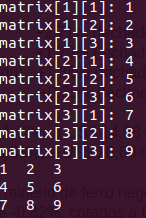
Array of arrays in C++

Matrix Exercise in C ++

Create a 4x4 matrix, where each row represents a student's grades, and each column is a different subject. You must create a function that will fill in the students' grades, one by one, indicating which is the subject and which is the student.

Then, your program should display, in an organized manner, the grades of each student, as well as the average of each, the class average for each subject, and the general average, of all students of all grades.

Post your solution in the comments.

Matrix in C++: Array of Arrays

In this tutorial from our C++ Course, we will learn the important concept of matrix in C++.

Array of Arrays - What is it? What is it for?

So far, in our arrays section, we have created arrays of integers, float, doubles, char etc.
That is, we create arrays that store numbers or characters.
However, it is also possible to store other things in arrays.

A curious thing to store in arrays are other arrays.

For example, imagine that you were hired by a school to do a C++ program that will, among other things, store students' grades. Each student has, for example, 5 different grades.

You can, first of all, reason like this: create an array to store students.
For example: students[10]

However, each student has 5 grades. So each student will have an array of grades:
notes[5]

You see: we have an array of students, each block represents a student. And within each block, that is, each student, there is a kind of internal array, with the grades of each student. Each student has his own array of grades, and each student is part of the student array.

Shall we formalize this?

How to declare an Array in C++

We call it a matrix, an array of arrays, or multidimensional arrays.
So far, we only work with arrays of one dimension, just a 'line' of blocks, which form an array.

To increase the number of dimensions of an array, just add pairs of square brackets, for example:

  • To declare an array of one dimension, we do: float grade[5];
  • To declare an array of two dimensions, we do: float students[10][5];


Come on. When we do 'float grade[5]' we mean: 5 float blocks.
When we do: 'float students[10][5]', we mean: 10 blocks, where each block has an array inside, of 5 floats.

We say that this is a 10x5 matrix (10 rows and 5 columns, where each row represents a student, and each column represents a different grade).

To make it easier, let's imagine a 3x3 matrix, we declare it like this:

  • int matrix[3][3];


The expression 'matrix[3]' means: an array of 3 elements.
What does each element contain? An integer? A float? A char? No, each element is another array, of size [3].

See the representation of this matrix:
Matrix in C++

The first element of our matrix is: matrix[0]
It is an array, of 3 elements, which are represented by:
First element: matrix[0][0]
Second element: matrix[0][1]
Third element: matrix[0][2]


The second element of our matrix is: matrix[1]
It is an array, of 3 elements, which are represented by:
First element: matrix[1][0]
Second element: matrix[1][1]
Third element: matrix[1][2]

The third element of our matrix is: matrix[2]
It is an array, of 3 elements, which are represented by:
First element: matrix[2][0]
Second element: matrix[2][1]
Third element: matrix[2][2]

That is, to declare an array of 'i' rows and 'j' columns, we do:

  • type matrix[i][j];


If you have studied matrix and determinants at school, you should remember how to use a matrix, how to flag each element, etc. The only difference here is that the count starts from index 0, instead of 1.

How to initialize a Matrix in C++

We will create a matrix to store the grades of 3 students, where each student has two grades.
That is, we will have a matrix of 3 rows (one for each student) and 2 columns (each column represents a grade). We declare this matrix, then:

  • grade float[3][2];


We will now initialize a 3x3 matrix, for example, with the notes:
float grade[3][3] = {{9.5, 9.1},
                                {8.8, 8.4},
                                {10.0, 10.0}};


The first student's grade array is: {9.5, 9.1}
The second student's grade array is: {8.8, 8.4}
The third student's grade array is: {10.0, 10.0}

For example, what is the second student's first grade? Second student is student 1, first grade is index 0, so that grade is stored in: grade[1][0] = 8.8
The second grade of the second student is: grade[1][1] = 8.4

Simple, isn't it?