Showing posts with label Data structure. Show all posts

Data Structure: struct - What is it, what is it for and how to use it?

In this tutorial, we will begin the study of data structures, in C++.

Data Abstraction

One of the most important concepts in Computer Science is that of data abstraction. Also called ADT, abstract data type.

Abstraction, in computing, refers to a model of something, a prototype, a generalization of something.

For example, Human is an abstraction. You don't know a Human, you actually know specific people, like your father, your mother, your friends. Humans is a 'mold', to represent an object that has a head, brain, heart, lung, etc.

The same goes for Carro. You don't come to the dealership and say 'I want a car'.
You say: I want a Corolla, a Civic, a Honda Fit, etc.

Car is a generalization of a thing that has all, engine, gear etc.

Well, the same happens in our dear and beloved programming, it is super common in a project to create our abstractions, to represent 'things' of the system that we are going to implement.

Data Structures: structs

So far, we have used very specific data types, such as int, double and float (to work with numbers) or char, to work with characters, for example.

Through arrays, we can create and work with any number of these types of data in a very easy and powerful way.

However, there is a problem. The data types of an array are always the same. You can't have an array that has an integer inside representing an employee's age, a string storing the name and a float to store your salary.

Well, that's what structs are for: packaging other types of data, to create your own type of data. Through structs, we can create new types of data.

For example, let's create the data type Car, inside it there is an integer to store the number of doors, a float to store the engine power and a string to store the model name.

Estrutura de Dados em C++

If before we did:
  • int number;
  • float price;
Now let's do:

  • Employee Jose;

That is, we are declaring a variable named 'Jose', which is of type 'Employee'. Yes, type 'Employee', as well as data type int, float, char, etc.

It is a type of data that you created, a necessary abstraction in your project, and this is done through structs! It can contain as many variables as you want and of any type, it can have arrays, pointers, matrix, etc. All of this 'packaged', in a data structure that you have named.

In the next tutorial, we will learn how to create, access and use a struct, in C ++!

Arrays in C++: What are they? What is it for?

In this introductory tutorial of our Arrays section, we will begin to study this important subject and tool, which you will use a lot, in your C++ programs.

What is an Array?

The array is a type of data structure (data collection), of the same type. That is, it is an existing way of working with various amounts of variables.

So far, we have studied only unique variables, which receive and store a single piece of information, such as a number. It is a memory block reserved to store some data.

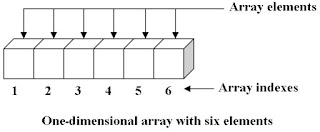
In the case of the array, it is a group of variables of the same type. When we declare a array, C++ goes there and reserves a very large block of memory, enough to fit several variables, all addresses are neighbors.

Like structs and classes, arrays are static, that is, during execution they always have the same size.

Initially, we will study arrays in the style of C language, based on pointers (which we will study soon). Later in our course, in the STL (Standard Template Library) section, we will get to know arrays as complete and much more versatile objects.

But first, we need to understand a little more about arrays.

What is an array for ?
An array of one dimension, with 6 elements (variables of the same type)


What is an array for?

Imagine that you want to average two students in your class.
Just declare two variables: a and b, and do (a + b) / 2
Simple, right?

What if you want to average three students grades?
Time, of course: (a + b + c) / 3

Cool ... what if you want to average a class of 30 students?
Will you declare 30 variables and do: (a + b + c + d + e + f + g ....) / 30?

It doesn't even have 30 letters in the alphabet.

That's where the concept of array comes in.
Let's just declare a float array, for example, of size 30.

That is, 30 float variables, memory neighbors, will be allocated on your machine, at once, when creating this array.

Basically, this is what an array is for: let's learn how to declare, initialize, use and handle large blocks of information at once, handling 10, 10, 1,000 or 1 million variables at once, in a very automated and simple, through arrays.